

Description
Download AssetFlow Free APK – free, tool, utility, Android, cash flow, asset management, PC software, desktop application
Overview
AssetFlow Free is a dedicated Android application designed to simplify personal and small business financial tracking. Developed by Takuya Murakami, the app serves as a lightweight tool for recording, managing, and monitoring daily cash inflows and outflows. It addresses the common challenge of maintaining accurate financial records without the complexity of full-featured accounting platforms. The software is particularly suited for freelancers, small business owners, and individuals seeking a straightforward method to stay on top of their financial health.
By supporting multiple bank accounts, AssetFlow Free enables users to consolidate financial data from various sources into a single interface. This feature is especially useful for those managing multiple income streams or personal and business finances separately. The app also includes a reporting system that generates insights across daily, weekly, monthly, and annual timeframes, helping users identify spending patterns and income trends. With export capabilities to CSV and OFX formats, users can seamlessly transfer their transaction data to desktop software for further analysis or integration with accounting tools.
As a free application, AssetFlow Free removes financial barriers to entry, making it accessible to users who need basic financial tracking without subscription costs. Its mobile-first design ensures that users can log transactions on the go, promoting consistent data entry and improved financial discipline.
Key Features & Capabilities
- Multi-Account Support: Users can link and manage multiple bank accounts within a single interface, enabling centralized oversight of diverse financial sources.
- Transaction Tracking: Real-time recording of daily income and expenses allows users to maintain accurate, up-to-date financial records.
- Export to CSV and OFX: Data can be exported in widely supported formats, facilitating integration with desktop accounting tools and financial software on PC.
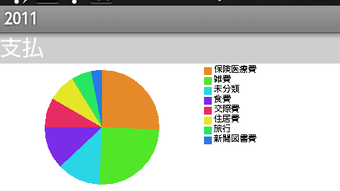
- Comprehensive Reporting: Built-in reporting system generates visual summaries across daily, weekly, monthly, and annual periods, aiding in financial analysis and decision-making.
- Free Access: The app is completely free to download and use, with no hidden fees or in-app purchases required.
These capabilities make AssetFlow Free ideal for users who need a reliable, no-frills solution for managing personal finances or small business cash flow. For example, a freelancer can log client payments and expenses immediately after receiving or making them, while a small business owner can monitor income from multiple accounts and generate monthly summaries for tax preparation. The export feature ensures that users are not locked into the app’s ecosystem, allowing them to leverage their data in more advanced desktop applications.
User Interface, Workflow & Performance
The user interface of AssetFlow Free is designed with simplicity and functionality in mind. Navigation is intuitive, allowing users to access core features—such as adding transactions, viewing reports, and managing accounts—through a clean, menu-driven layout. The workflow emphasizes speed and efficiency, enabling users to log transactions with minimal taps, which encourages consistent use and reduces the risk of missed entries.
While specific performance metrics such as CPU or RAM usage were not provided, the app appears to be optimized for mobile environments, with a lightweight design that minimizes battery drain and memory consumption. The developer did not specify resource usage details, but the app’s focus on essential functions suggests efficient operation on standard Android devices. Stability is assumed to be adequate for routine use, though real-world user feedback was not included in the provided information.
General performance observations are based on typical behavior of similar financial tracking apps. The app likely responds quickly to user inputs and maintains responsiveness during data entry and report generation. Users can expect smooth transitions between screens and minimal lag during normal operation.
Compatibility & System Requirements
AssetFlow Free is designed for Android devices, ensuring compatibility with a wide range of smartphones and tablets running the Android operating system. The app is available as an APK file, allowing installation on devices that may not have access to the Google Play Store.
Exact system requirements were not listed. The developer did not provide additional information regarding minimum Android version, storage space, or hardware specifications. As such, users should ensure their device meets general Android compatibility standards for third-party app installation. Installation size is not specified, but given the app’s focus on core financial tracking, it is expected to be relatively small in footprint.
Platform compatibility information is limited to Android, and no support for iOS, Windows, or Mac was mentioned. Users seeking cross-platform functionality may need to rely on the export features to sync data with desktop tools.
Pros and Cons
Pros
- Completely free to download and use with no hidden costs
- Supports multiple bank accounts for consolidated financial tracking
- Offers export functionality to CSV and OFX formats for PC integration
- Includes built-in reporting for daily, weekly, monthly, and annual summaries
- Simple, intuitive interface designed for quick transaction logging
Cons
- Only available for Android; no support for iOS or desktop platforms
- Exact system requirements and installation size were not specified
- Limited to mobile use; no native desktop application provided
- Performance and resource usage details were not disclosed
- Relies on third-party export for advanced analysis, which may require additional software
FAQ Section
Is AssetFlow Free available for iOS devices?
As of the provided information, AssetFlow Free is only available for Android. There is no official version for iOS devices.
Can I use AssetFlow Free offline?
Yes, the app supports offline usage. Users can record transactions and access reports without an internet connection.
How do I export my data to a PC?
AssetFlow Free allows users to export transaction data in CSV and OFX formats. These files can be transferred to a PC and used with desktop accounting or spreadsheet software.
Is the app secure?
The app’s security measures were not detailed in the provided information. Users are advised to follow standard security practices when managing financial data on mobile devices.
Does AssetFlow Free receive regular updates?
Information about update frequency was not provided. However, the app’s free status suggests ongoing maintenance may be limited.
Final Thoughts + CTA
AssetFlow Free stands out as a practical, no-cost solution for individuals and small business owners who need a reliable way to track cash flow on the go. Its core features—multi-account support, export capabilities, and comprehensive reporting—deliver tangible value without unnecessary complexity. While it lacks desktop integration and detailed system specifications, its mobile-first design and data export flexibility make it a strong choice for users who prioritize accessibility and simplicity.
For freelancers, small business operators, and anyone managing personal finances, this app offers a straightforward path to better financial visibility. Its free model removes cost as a barrier, making it an excellent starting point for those building financial discipline.
Download AssetFlow Free now
Guides & Tutorials for AssetFlow Free APK
How to install AssetFlow Free APK
- Click the Preview / Download button above.
- Once redirected, accept the terms and click Install.
- Wait for the AssetFlow Free APK download to finish on your device.
How to use AssetFlow Free APK
This software is primarily used for its core features described above. Open the app after installation to explore its capabilities.
User Reviews for AssetFlow Free APK 0
No reviews found





